Bring Back 3:2 Aspect Ratio GIF
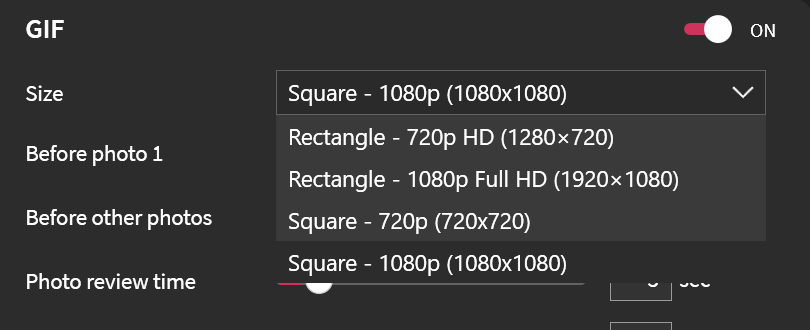
Restore the 3:2 aspect ratio option (720x960 or higher) for GIF, 360, and video outputs as in version 7. With GIFs forced to the video aspect ratio, people at the edges of the frame get cropped out of the result.
Consolidated from 2 customer requests on 3 Sep 2026.
Original request
Bring back 3:2 Aspect ratio on GIF, 360 and Video like in version 7. We can’t migrate to version 8 until at least this feature back.
1080×720 or even higher resolution
Log in to comment and vote
Comments7
Luma Mike
Jun 10
This is now available in v8.2.0 for Windows and v5.2 for iPad, iPhone, and Mac. You can also set it in the LumaBooth Dashboard at dash.lumabooth.com
See dslrbooth.com/releases
Marty
Jun 9
Hello!
Great news. The 3:2 aspect ratio GIF option you asked for is back in v8.2.0, and we've added a matching 2:3 (vertical) option as well.
We've also tidied up the GIF and video size choices into a clearer set of standard options across the app.
To get the update, open LumaBooth Windows and go to Help, then Check for Updates.
Thank you for the suggestion and for helping make LumaBooth better. If there's anything else you'd like to see, just let us know.
fotomaticcebu
Jun 3
Please release this update asap
Gem Snaps Photo Booth
May 29
•Merged request
•9 votes
Can you please return the 3:2 aspect ratio 720x960 gif or the same dimension?
Hello! I have been using lumabooth for almost 10 years now and love all the new features! I noticed in the new update the gif dimensions are now the same as the video ones. Can you please let us have the option of the 720×960 rectangle dimensions again? My clients are getting cropped out of their gifs :( Previously, this was not an issue because everyone on the screen when the image is taken is still visible when the gifs are generated. Thank you!!
fotomaticcebu
May 29
Please bring back this option
Yulashar M
May 21
very important … please fix ASAP
Salvador Heydemans
May 14
i think its very important for users .. please fix ASAP.