Sequential Upload and Proper Sharing Status Count
Upload sequentially (first in, first out) instead of in bulk when the connection is slow, with the option to pause, resume, and prioritize specific uploads, and make the Sent count reflect completed files rather than attempts including failures.
Consolidated from 2 customer requests on 3 Sep 2026.
Original request
Current upload system i believe it tries to upload using bulk, for example trying to 10 photos at the same. However, for event where internet connection is bad/slow, this system is not good because once there is enough backlog, the chance for failure increased, it keeps getting worse.
My suggestion is to add option to upload sequentially. FIFO.
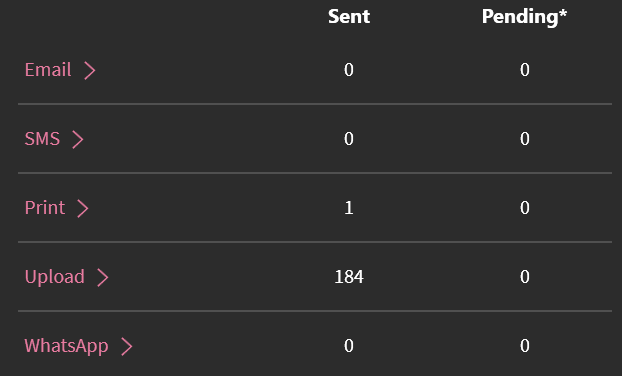
Another issue is the Upload Sent Count, i think it’s calculating total sent (including failures). It should be counting total session or files not including failures.
Tested on v8.2.0
Log in to comment and vote
Comments1
EmPar Fotografia - 360º
Sep 3
•Merged request
•1 vote
Feature Request: Improved Video Upload Management in Lumabooth
I would like to suggest an improvement to the video upload functionality in the Lumabooth app.
Currently, when multiple videos are uploaded simultaneously, the process can become slow and inefficient, especially when working with a low internet connection. To enhance performance and user control, it would be very helpful to have:
Ordered (queued) uploads, where videos are uploaded sequentially or based on priority.
The ability to pause and resume specific uploads, allowing users to prioritize certain videos over others.
These features would significantly improve the upload experience, particularly in situations with limited bandwidth, by optimizing the use of available internet speed and giving users more control over the process.
Thank you for considering this improvement.